Command Rewards
Configure item rewards at skill milestones
Overview
Command rewards let players earn items at skill level milestones. Every reward is a command executed when the player claims it, making the system fully customizable. See the Item Rewards page for the player-facing experience.
The config file mods/mmoskilltree/command-rewards.json uses an override-based system — your customizations are stored separately from defaults and preserved across mod updates.
File Structure
{
  "schemaVersion": 1,
  "enabled": true,
  "overrides": {
    "MINING": {
      "10": [
        {
          "command": "/give {player} Ingredient_Bar_Iron --quantity=25",
          "localizationKey": "reward.item.iron_bars",
          "color": "#ffaa00"
        }
      ]
    },
    "TOTAL_LEVEL": {
      "100": [
        {
          "command": "/mmoboost give --args={player}|ALL|1.5|30",
          "displayName": "1.5x All-Skills Boost (30m)",
          "color": "#4aff7f"
        }
      ]
    },
    "GLOBAL_SKILL": {
      "50": [
        {
          "command": "/give {player} Ingredient_Gem_Sapphire --quantity=3",
          "localizationKey": "reward.item.sapphire"
        }
      ]
    }
  }
}
Reward Categories
| Key | Description |
|---|---|
MINING, SWORDS, etc. | Per-skill rewards at individual skill milestones |
TOTAL_LEVEL | Rewards based on combined level across all skills |
GLOBAL_SKILL | Bonus rewards earned by every skill at milestone levels |
Reward Fields
| Field | Required | Description |
|---|---|---|
command | Yes | The command to execute when claimed |
localizationKey | No | Key from language files for display name (preferred for multi-language servers) |
displayName | No | Literal display name (fallback if no localization key set) |
color | No | Hex color for UI display (e.g., #ffaa00) |
runAs | No | CONSOLE (default) or PLAYER |
Command Placeholders
| Placeholder | Replaced With |
|---|---|
{player} | Player name |
{level} | The milestone level |
{skill} | Skill name (e.g., MINING) |
{totalLevel} | Player's total level |
Auto-Derived Display
If you don't set displayName, localizationKey, or color, the mod automatically derives them from the item ID in the command. Item IDs are converted to human-readable names and assigned tier-appropriate colors.
| Tier | Color | Examples |
|---|---|---|
| Common | Gray | Iron, Copper |
| Uncommon | Green | Cobalt, Thorium |
| Rare | Blue | Adamantite, Mithril |
| Epic | Purple | Onyxium |
| Legendary | Orange | Prisma, Voidstone |
You can always override the auto-derived values by setting displayName, localizationKey, or color explicitly per reward entry.
Override Semantics
- Missing levels use defaults automatically — you only need to define levels you want to change
- Set a level to an empty array
[]to disable rewards at that level - New defaults added in mod updates propagate without losing your customizations
- Reference file at
mods/mmoskilltree/_reference/defaults-command-rewards.jsonshows all defaults
Disabling Rewards
Disable All Item Rewards
- Admin UI (Recommended) — Open
/mmoadminand toggle "Item Rewards" in General Settings - Config File — Set
"enabled": falseincommand-rewards.json
When disabled, the Rewards tab is hidden from the /xp page.
Disable a Specific Level
Set the level to an empty array in overrides:
"overrides": {
  "MINING": {
    "10": []
  }
}
Disable an Individual Reward
Override the level with only the rewards you want to keep. Any default rewards not included in your override are effectively disabled. The Admin Rewards Editor provides an inline disable button for this.
Admin Rewards Editor
A visual editor for command rewards, accessible via the "Edit Rewards" button in /mmoadmin.
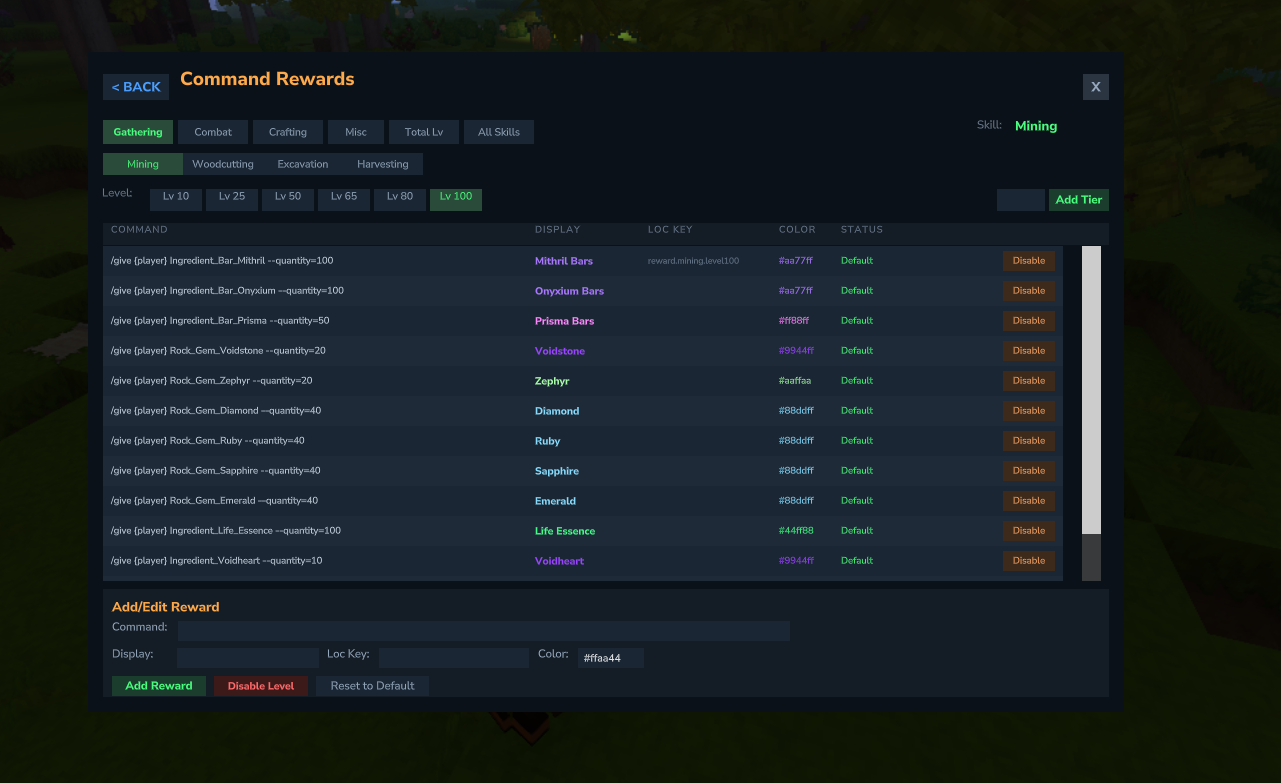
- Category tabs — Gathering, Combat, Crafting, Misc, Total Level, All Skills (Global)
- Skill selector for per-skill categories (hidden for Total Level and All Skills)
- Level selector showing all configured milestone levels
- Reward table with columns: Command, Display Name, Loc Key, Color, Status
- Add rewards with command, display name, localization key, and color
- Inline Disable — Disable individual default rewards (creates override without that reward)
- Remove — Delete individual override entries
- Disable Level — Set empty override (no rewards at that level)
- Reset to Default — Remove override and restore defaults
Commands
# Reset a player's claimed rewards
/mmoconfig resetrewards --args=PlayerName

# Reload all configs (including command rewards)
/mmoconfig reload

# Reset all configs to defaults
/mmoconfig reloaddefaults
Examples
Add a Custom Reward
Give 50 gold bars at Mining level 25:
"overrides": {
  "MINING": {
    "25": [
      {
        "command": "/give {player} Ingredient_Bar_Gold --quantity=50",
        "displayName": "Gold Bars x50",
        "color": "#ffaa00"
      }
    ]
  }
}
Add a Boost Token Reward
Give a 2x Mining boost token at Mining level 75:
"overrides": {
  "MINING": {
    "75": [
      {
        "command": "/mmoboost give --args={player}|MINING|2.0|30",
        "displayName": "2x Mining Boost (30m)",
        "color": "#c84aff"
      }
    ]
  }
}
Add a Total Level Reward
Give a global server boost at total level 500:
"overrides": {
  "TOTAL_LEVEL": {
    "500": [
      {
        "command": "/mmoboost give --args={player}|ALL|1.5|30|global",
        "displayName": "1.5x Global Boost (30m)",
        "color": "#ffaa4a"
      }
    ]
  }
}