XP Values Configuration
Customize XP per block, item, and weapon
Overview
XP values are stored in mods/mmoskilltree/xp-maps.json using an override-based system. The file only contains your customizations - defaults are built into the mod.
Shipping XP values in a content pack
Prefer a content pack: author one file per skill's XP map under Server/MMOSkillTree/XpMaps/ inside a pack folder, zip it, and drop the .zip into your server Mods/ folder. Building the zip.
mods/mmoskilltree/xp-maps.json stays the quick per-server tweak that always wins.
// Server/MMOSkillTree/XpMaps/MyPack_Weapons.json
{
  "MINING": {
    "Ore_Voidstone_": 220
  }
}
Precedence is the ordinary one: built-in defaults, then packs, then your xp-maps.json, which always wins. See Combat XP Modes for which modes actually read weapon XP values at all.
Pattern Matching
Block and item IDs use substring matching:
Ore_matches ALL ores (Ore_Iron_, Ore_Diamond_, etc.)Ore_Diamond_matches only diamond ore variantsWood_Logmatches all log types
Modded Weapons: MMO_Weapon_Type Tag
Added in v1.0.3. Mod and content-pack authors can route a custom weapon to a combat skill without editing xp-maps.json by adding an MMO_Weapon_Type tag to the weapon's item JSON. It is a fallback: when the xp-map lookup above misses for a held item, the resolver reads the tag and routes XP to the first listed value that names a registered skill.
See the dedicated Weapon Skill Tags page for where the tag goes (the uppercase Tags block), the matching rules, valid skill IDs, and troubleshooting.
Commands
# Set XP for a pattern
/mmoconfig mining --args=Ore_Diamond_|150

# Set XP for all ores (wildcard)
/mmoconfig mining --args=Ore_|25

# View current values
/mmoconfig list --args=mining

# View only your customizations
/mmoconfig diff --args=mining

# Reset a pattern to default
/mmoconfig remove --args=mining|Ore_Diamond_

# Disable a pattern (no XP)
/mmoconfig disable --args=mining|Wood_Log
File Structure
{
  "schemaVersion": 1,
  "xpMaps": {
    "MINING": {
      "Ore_Iron_": 50,
      "Ore_Diamond_": 150,
      "Wood_Log": -1
    },
    "WOODCUTTING": {
      "Wood_Oak": 10
    }
  }
}
Special Values
-1- Explicitly disable a pattern (no XP given)0- Pattern gives zero XP (still processed)- Positive number - XP awarded for matching blocks/items
Decimal Values
XP values accept decimals - e.g. 0.5, 2.5, 12.75. Useful when you want weapon scaling (which multiplies weapon XP into mob-kill XP) to resolve to small, specific base amounts. Applies to both xp-maps.json and mob-kill-xp.json.
Fishing integrations
An installed fishing integration (HyFishing or the CozyTales Fishing adapter) pays Fishing XP per catch, and those per-catch payouts are retuned in this file's FISHING block the same as any other pattern - same syntax, same commands, same admin page.
Reference Files
Check mods/mmoskilltree/_reference/defaults-xp-maps.json for all default values. This file is auto-generated and read-only.
Admin UI
Use /mmoadmin → "Edit XP Values" for a visual editor:
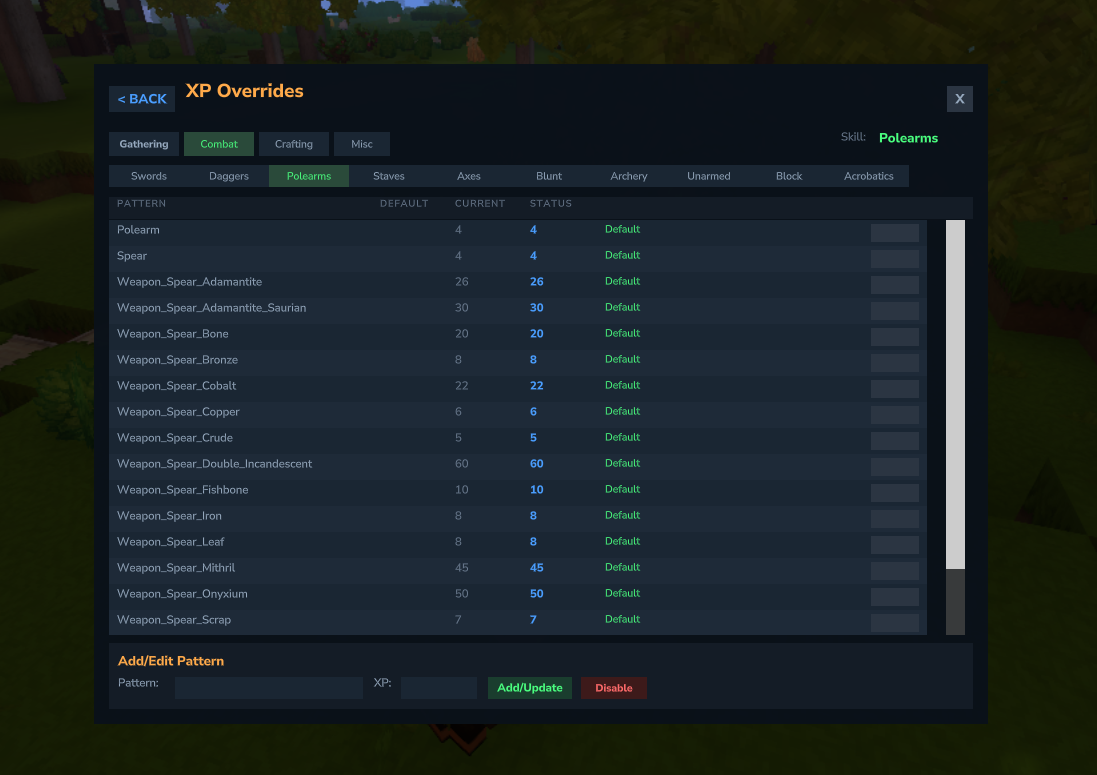
- Browse by category and skill
- See default vs. current values
- Status indicators: Default (green), Override (orange), Disabled (red)
- Click pattern name to copy to text field
Best Practices
- Use specific patterns before wildcards (more specific = higher priority)
- Test with
/mmoconfig listto verify patterns match correctly - Use
/mmoconfig trimto remove redundant XP overrides - it strips only XP-map redundancy, nothing else - Back up your
xp-maps.jsonbefore major changes