Getting Started
Learn how to install and start using MMO Skill Tree
Premium Add-ons
One-time purchases, never expire. The base mod is 100% free.
Installation
MMO Skill Tree 1.6.0 requires a Hytale Update 6 (0.6.x) server; the jar's manifest targets >=0.6.0-pre.13 <0.7.0, and it does not load on an older server.
ZiggfreedCommon is required
/zigprogress, the branching dialogue engine, NPC placement, the shared economy behind /zigcommerce, feedback moments (toasts, sounds, broadcasts, with a neutral default file for each), the in-world quest tracker, and the placed-block ledger, and it ships neutral default shelf and grade words in all nine bundled languages. See ZiggfreedCommon for the owner's map of what it owns, and Add-ons for the full companion ecosystem.- 1
Install ZiggfreedCommon
DownloadZiggfreedCommon-2.1.0.jar(or newer) from CurseForge and place it in your server'smods/folder. This must load before the MMO Skill Tree jar. - 2
Install MMO Skill Tree
- 3
Add packs and companion mods (optional)
The official content packs and the optional companion mods each install the same way (a download intomods/), but which needs what is its own subject: Add-ons: install order is the one walkthrough for the full stack. - 4
Start the server
Configs are auto-generated inmods/mmoskilltree/. The shared library writes its own owner files and runtime stores undermods/ziggfreedcommon/. - 5
Start playing!
Jump in and start earning XP.
Two ways to customize
A quick tweak goes in an owner file under mods/mmoskilltree/. Anything you want portable or shippable is a content pack, a folder of JSON zipped up and dropped into the same mods/ folder, so an update never overwrites it. See Content Packs as the primary route for customization.
Upgrading from 1.5.x?
/mmomigrate for a plain-language report of every older file, what boot already converted on its own, what it can convert for you (--action=owner --confirm=yes, with backups made first), and what needs your hand. Content packs go through the web Migration Converter instead.Your First Steps
Once installed, simply play the game! You'll gain XP automatically by:
- Mining blocks (ores, stone, gems)
- Chopping trees
- Digging soil, sand, and dirt
- Harvesting plants and crops
- Fishing at water
- Crafting items
- Building structures
- Fighting enemies with various weapons
Breaking your first block triggers a short introductory quest that hands you two reusable tools: a Skills Menu Scroll (opens the skills menu on use) and a Quest Book (opens your quest log on use), so you never have to remember a command just to check your progress.
Essential Commands
One command opens everything:
| Command | Description |
|---|---|
/xp | Open the main UI - skills, rewards, quests, boosts, leaderboard, and settings |
/xpdisplay 10 | Only show XP gains ≥ 10 |
Understanding the UI
Skill Overview (/xp)
The main hub for all your skill progression. Use /xp to open it.
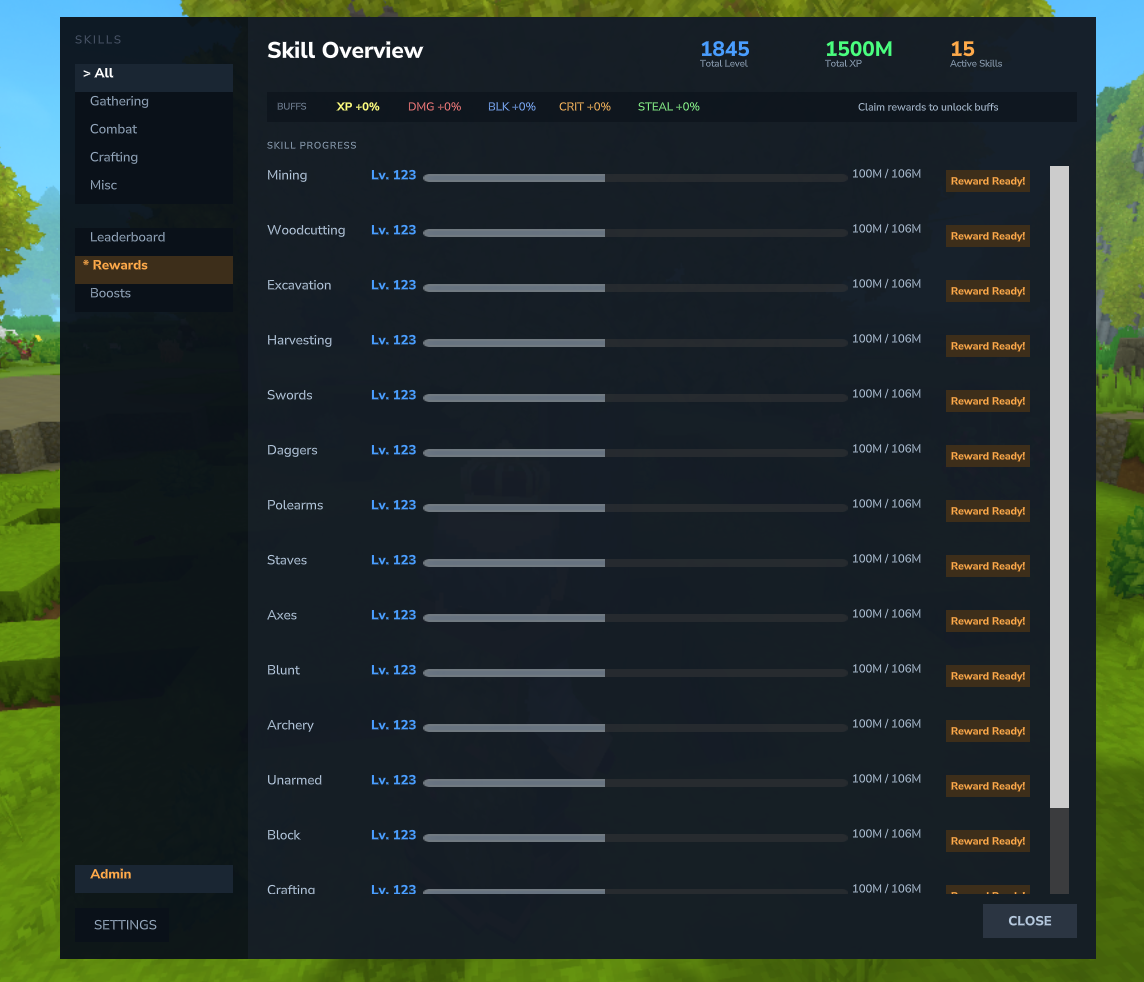
- Skill Cards - Each skill displays as a card showing name, level, progress bar, color-coded buff labels, tier progress, and next reward hint
- Total Level Card - A special summary card showing your combined level, total XP, and aggregate buffs
- Category Color Coding - Cards have colored accents: green for Gathering, red for Combat, orange for Crafting, purple for Misc
- Quick-Action Buttons - Each card has buttons to open the Skill Tree, Rewards, and Boost pages directly
- Buff Bar - See all active combat bonuses at the top (Damage, Block, Crit, Lifesteal)
- Filter by category: Gathering, Combat, Crafting, Misc
- Access Settings, Leaderboard, Rewards, Boosts, Quests, and Achievements tabs from the sidebar
- Side panel shows your tracked quests (up to 5) and active boosts alongside the skill cards
Skill Tree Page
Access the skill tree by clicking the "Skill Tree" button on any skill card in the /xp overview.
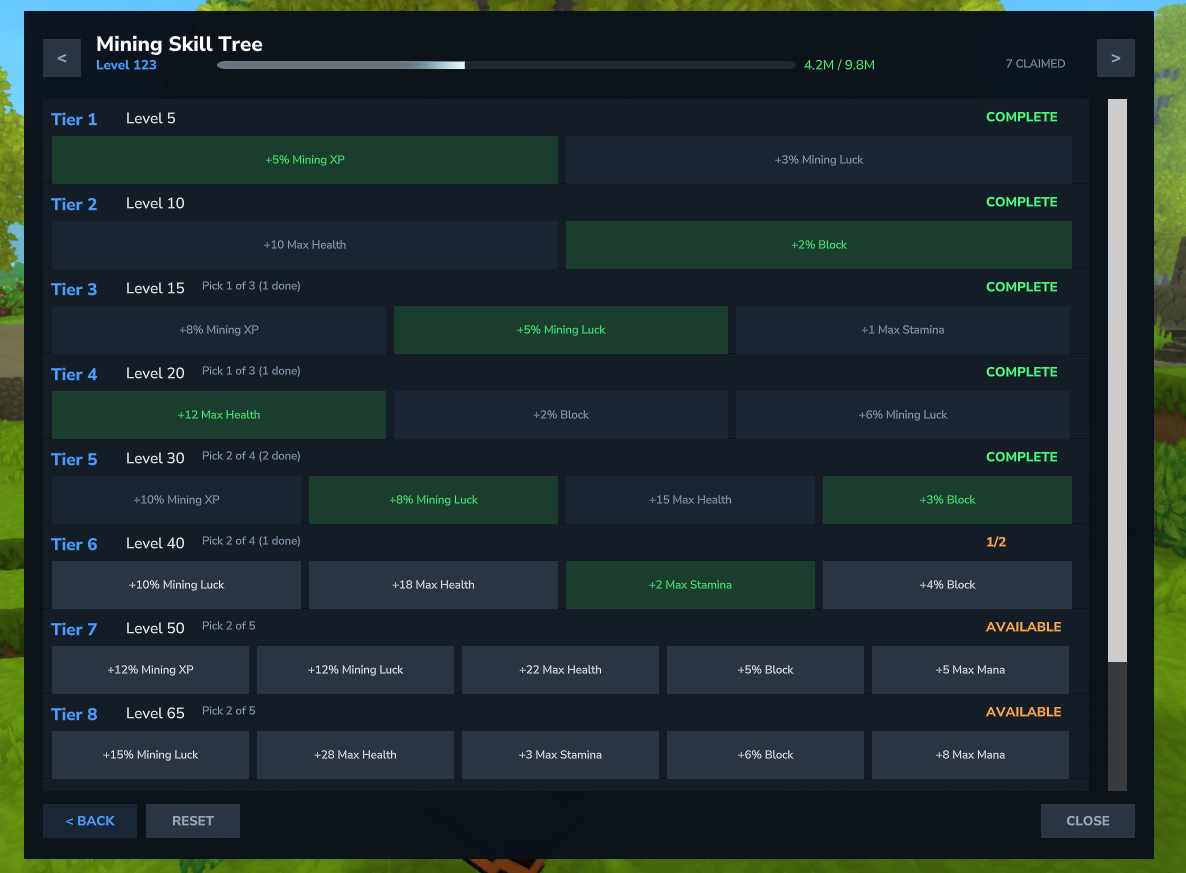
- Navigate between skills with arrow buttons
- See tier status: LOCKED, AVAILABLE, CLAIMED
- Claim rewards by clicking on available choices
- Reset button to respec your choices
Next Steps
- Learn about all 20 skills and how to level them
- Explore the skill tree rewards and active abilities
- Deepen your build with mastery and currencies
- Claim item rewards at level milestones
- Chase achievements and track your Power Level
- Customize content with content packs, or check the full command reference