Configuration
Server owner guide to customization
Admin UI
The fastest way to configure common settings is via /mmoadmin:
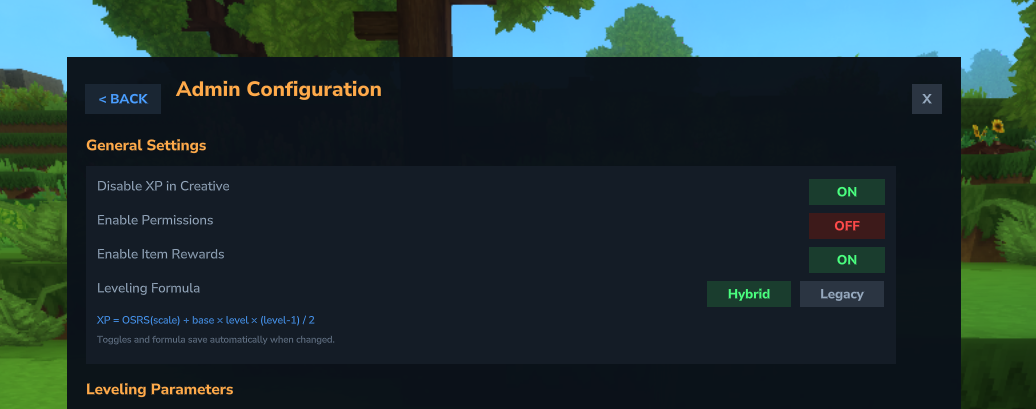
- Disable XP in Creative - Toggle whether creative mode players gain XP
- Skill Permissions - Toggle permission-based skill access
- Item Rewards - Enable/disable item rewards at milestones
- Boost Stacking Limits - Configure max multiplier, active boost caps, and stack mode
- Allow Skill Tree Reset - Toggle whether players can respec their reward choices
- Default Language - Set which language new players start with
- Max Levels - Set a default max level for all skills (default: 100) and override it per-skill. XP stops being awarded once a skill reaches its cap
- Milestone Announcements - Run commands when players reach configurable level milestones (e.g., broadcast achievements with
/say) - Award Boost - Grant boost permissions or tokens to players
- Mob Kill XP - Configure per-mob XP values and weapon scaling for kill-only combat mode
- Edit XP Maps - Visually edit XP values per skill
- Edit Rewards - Visual editor for command rewards per skill and level
- Edit Skill Tree - Customize skill tree reward tiers, levels, and choices
- Edit Tokens - Browse and modify XP token and boost token values
Changes made via /mmoadmin are saved immediately to the config files.
Config Files
All configs are located in mods/mmoskilltree/:
| File | Purpose | Type |
|---|---|---|
skill-config.json | Leveling formula, max levels, permissions, tracking, boost stacking limits | Traditional |
xp-maps.json | XP values per block/item/weapon | Override |
luck-loot.json | Luck bonus loot tables | Override |
skill-tree.json | Milestone levels, reward choices | Override |
command-rewards.json | Item rewards at milestones | Override |
mob-kill-xp.json | Per-mob base XP for kill-only combat mode | Override |
xp-tokens.json | XP token amounts, boost multipliers/durations, enable/disable tokens | Override |
item-requirements.json | Item and block level requirements | Override |
action-requirements.json | Tool type requirements for blocks and weapon type requirements for mobs | Override |
boost-templates.json | Boost template definitions for permission-based boosts | Override |
custom-skills.json | Custom skill definitions and overrides | Override |
white-label.json | Server branding and white-label customization | Override |
integrations.json | Third-party mod integration settings | Override |
quests/*.json | Quest definitions, objectives, and rewards | File-based |
localization/*.json | Language files | - |
Config Types
Override-Based Configs
Most config files (xp-maps.json, luck-loot.json, skill-tree.json, command-rewards.json, mob-kill-xp.json, xp-tokens.json, item-requirements.json, action-requirements.json, boost-templates.json, custom-skills.json, white-label.json, integrations.json) use an override system:
- Files store only your customizations, not all defaults
- Your changes are preserved across mod updates
- New defaults are added automatically
- Use
/mmoconfig diffto see what you've changed - Use
/mmoconfig trimto remove redundant entries
Traditional Configs
Other configs store all values and may be regenerated on version updates. Your old config is backed up automatically.
Quick Config Examples
# Set diamond ore to 150 XP
/mmoconfig mining --args=Ore_Diamond_|150

# All ores give 25 XP (wildcard pattern)
/mmoconfig mining --args=Ore_|25

# Disable a default pattern
/mmoconfig disable --args=mining|Wood_Log

# View your customizations
/mmoconfig diff --args=mining

# Remove a customization (revert to default)
/mmoconfig remove --args=mining|Ore_Diamond_

# Harder early game
/mmoconfig basexp --args=400

# Easier endgame
/mmoconfig scale --args=150
Detailed Guides
- XP Values Configuration - Customize XP per block, item, and weapon
- Leveling Formula - Understand and tune the XP curve
- Anti-Exploit Features - Placed block tracking, entity blacklist
- Skill Tree - Customize reward tiers, choices, and combat targeting
- Command Rewards - Customize item rewards at skill milestones
- Mob Kill XP - Configure per-mob XP values and weapon scaling for kill-only combat mode
- Quests - Create quests with objectives, prerequisites, and rewards
- XP Tokens - Configure consumable XP tokens and boost tokens
Reference Files
The mods/mmoskilltree/_reference/ folder contains read-only files showing all default values:
defaults-xp-maps.json- All default XP valuesdefaults-luck-loot.json- All default luck loot entriesdefaults-skill-tree.json- All default skill tree tiers and reward choicesdefaults-command-rewards.json- All default item rewards per skill and leveldefaults-mob-kill-xp.json- All default mob kill XP valuesdefaults-xp-tokens.json- All default XP token definitions
Hot Reload
Most config changes can be applied without restart:
/mmoconfig reload- Reload all configs from files/mmoconfig reloadlang- Reload language files/mmoconfig reloaddefaults- Reset to built-in defaults
Backup & Recovery
- Configs auto-backup when mod updates (look for
*_backup.json) - Player data stored in world's entity data (ECS components)
- Leaderboard cache in
leaderboard-cache.json